5.2. windows配置共享
5.2.1. windows设置文件共享
把 e:\app\share 设置共享
5.2.1.1. 在window设置共享
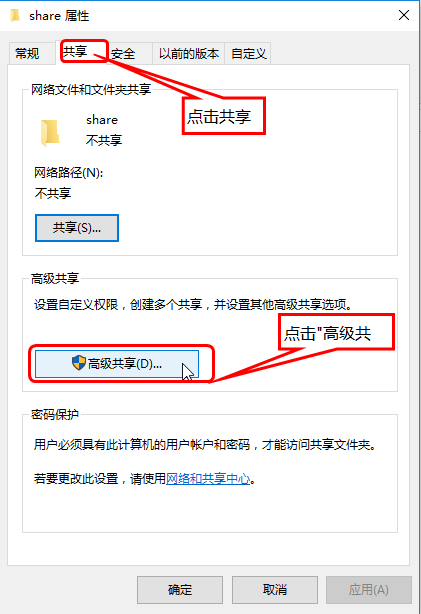
windows点击进入 E盘 的 app 目录,然后 右击 share文件夹,进入下图界面:
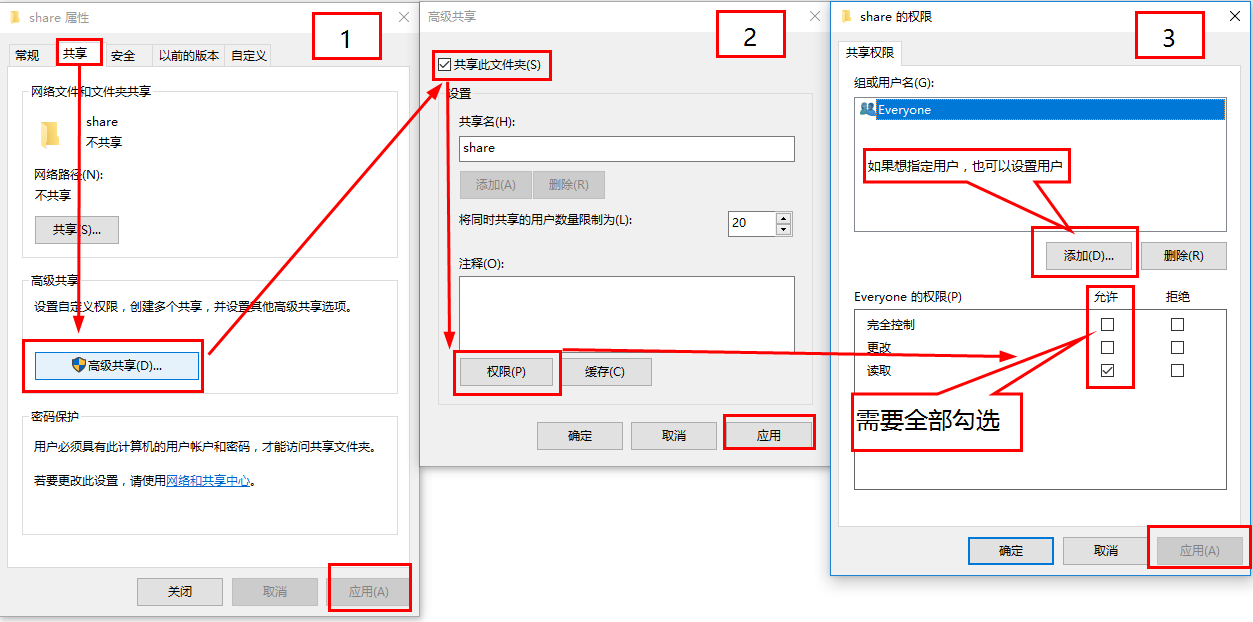
注意
上面是任意用户都有全部权限。但是可以通过设置用户来控制哪些用户可以访问这个共享目录。参考下面图片
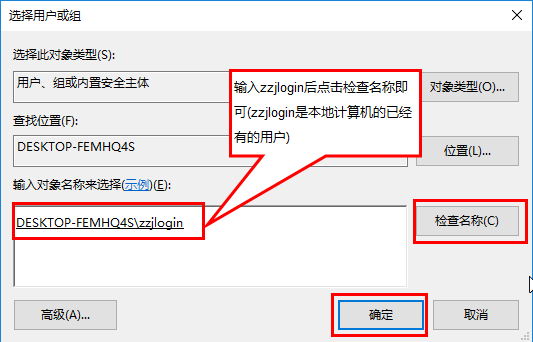
5.2.1.2. 本机测试
备注
下面这是没有设置用户密码。如果之后linux的链接之前会设置用户密码。
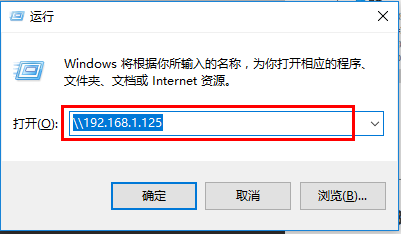
在本地用快捷键 ctrl+r 然后在运行的窗口输入: \\192.168.1.125 ,如下图:
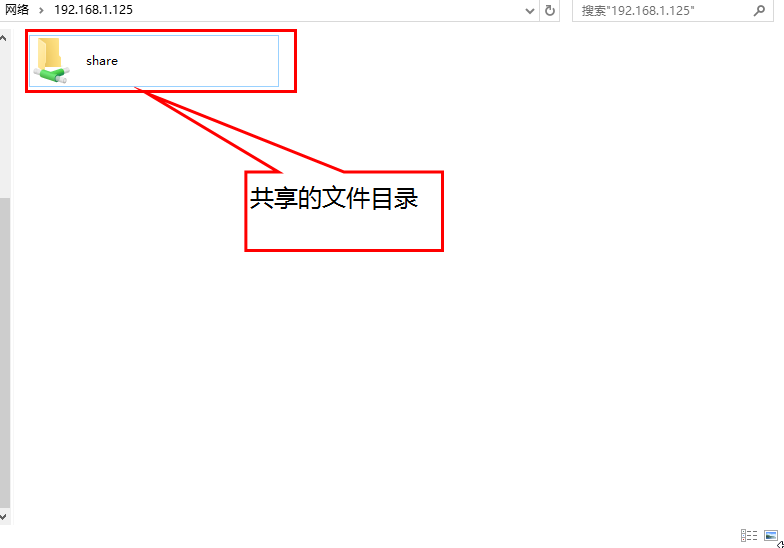
5.2.2. linux挂载windows共享目录
5.2.2.1. 安装samba客户端
- 需要安装的软件包:
samba
samba-client
cifs-utils
samba-common-tools
安装过程:
1[root@centos-155 ~]# yum install samba samba-client cifs-utils samba-common-tools -y
2[root@centos-155 ~]# rpm -ql samba
3[root@centos-155 ~]# rpm -ql samba-client
4[root@centos-155 ~]# rpm -ql cifs-utils
5.2.2.2. linux访问windows共享目录
用命令查看共享:
 1[root@zzjlogin ~]# smbclient -L 192.168.1.125 -m SMB2 -U zzjlogin
 2Unrecognised protocol level SMB2
 3Enter zzjlogin's password:
 4session request to 192.168.1.125 failed (Called name not present)
 5Domain=[DESKTOP-FEMHQ4S] OS=[Windows 10 Enterprise 14393] Server=[Windows 10 Enterprise 6.3]
 6
 7        Sharename       Type      Comment
 8        ---------       ----      -------
 9        ADMIN$          Disk      远程管理
10        C$              Disk      默认共享
11        D$              Disk      默认共享
12        E$              Disk      默认共享
13        F$              Disk      默认共享
14        G$              Disk      默认共享
15        IPC$            IPC       远程 IPC
16        share           Disk
17session request to 192.168.1.125 failed (Called name not present)
18session request to 192 failed (Called name not present)
19session request to *SMBSERVER failed (Called name not present)
20NetBIOS over TCP disabled -- no workgroup available
创建挂载密码
1[root@centos-155 mnt]# echo -e "username=zzjlogin\npassword=12345" >> /etc/samba.pass
2[root@centos-155 mnt]# cat /etc/samba.pass
3username=zzjlogin
4password=12345
密码文件权限设置(600)
1[root@centos-155 mnt]# chmod 600 /etc/samba.pass
添加开机自动挂载
 1[root@centos-155 mnt]# vim -n 1 /etc/fstab
 2# 添加如下行
 3//192.168.1.125/share      /mnt/zzjlogin     cifs vers=3.0,credentials=/etc/samba.pass 0 0
 4[root@centos-155 ~]# mount -a
 5[root@centos-155 ~]# cd /mnt/zzjlogin
 6[root@centos-155 zzjlogin]# touch test.txt
 7[root@centos-155 zzjlogin]# ll
 8total 2528009
 9-rwxr-xr-x 1 root root        182 May 28  2015 autorun.inf
10-rwxr-xr-x 1 root root 2588266496 Nov 19 22:42 cn_office_professional_plus_2016_x86_x64_dvd_6969182.iso
11drwxr-xr-x 2 root root          0 Nov 19 22:44 office
12-rwxr-xr-x 1 root root     413248 Aug 17  2015 setup.exe
13-rwxr-xr-x 1 root root          0 Feb  6 10:19 test.txt
14drwxr-xr-x 2 root root          0 Nov 19 21:24 下载合集