12.5. cobbler配置
- Date:
2018-09
12.5.1. 常用命令
cobbler check |
核对当前设置是否有问题 |
cobbler list |
列出所有的cobbler元素 |
cobbler report |
列出元素的详细信息 |
cobbler sync |
同步配置到数据目录,更改配置最好都要执行下 |
cobbler reposync |
同步yum仓库 |
cobbler distro |
查看导入的发行版系统信息 |
cobbler system |
查看添加的系统信息 |
cobbler profile |
查看配置信息 |
12.5.2. cobbler增加镜像
注意
本配置是在 cobbler安装配置 的基础上配置
如果是外接光驱挂载命令:
1[root@centos-cobbler ~]# mount /dev/cdrom /mnt/
2mount: block device /dev/sr0 is write-protected, mounting read-only
如果是把系统镜像文件传入cobbler服务器,则用:
1[root@centos-cobbler ~]# mount -o loop /data/CentOS-6.6-x86_64-bin-DVD1.iso /mnt/
把挂载的镜像加入cobbler仓库:
 1[root@centos-cobbler ~]# cobbler import --path=/mnt/ --name=CentOS-6.6-x86_64 --arch=x86_64
 2task started: 2018-10-20_165429_import
 3task started (id=Media import, time=Sat Oct 20 16:54:29 2018)
 4Found a candidate signature: breed=redhat, version=rhel6
 5Found a matching signature: breed=redhat, version=rhel6
 6Adding distros from path /var/www/cobbler/ks_mirror/CentOS-6.6-x86_64:
 7creating new distro: CentOS-6.6-x86_64
 8trying symlink: /var/www/cobbler/ks_mirror/CentOS-6.6-x86_64 -> /var/www/cobbler/links/CentOS-6.6-x86_64
 9creating new profile: CentOS-6.6-x86_64
10associating repos
11checking for rsync repo(s)
12checking for rhn repo(s)
13checking for yum repo(s)
14starting descent into /var/www/cobbler/ks_mirror/CentOS-6.6-x86_64 for CentOS-6.6-x86_64
15processing repo at : /var/www/cobbler/ks_mirror/CentOS-6.6-x86_64
16need to process repo/comps: /var/www/cobbler/ks_mirror/CentOS-6.6-x86_64
17looking for /var/www/cobbler/ks_mirror/CentOS-6.6-x86_64/repodata/*comps*.xml
18Keeping repodata as-is :/var/www/cobbler/ks_mirror/CentOS-6.6-x86_64/repodata
19*** TASK COMPLETE ***
- --path=PATH
必填项,镜像路径
- --name
必选项,为安装源定义一个名字,是cobbler中镜像的唯一标识,不可以重复,如果重复,系统会提示导入失败。可以用参数
--rename对已存在镜像重命名。- --arch=ARCH
非必选项,指定安装源是32位、64位、ia64, 目前支持的选项有: x86│x86_64│ia64
- --breed=BREED
非必选项,标记系统版本。
12.5.2.1. 导入用光驱挂载的镜像
1mount /dev/cdrom /mnt/
2cobbler import --path=/mnt/ --name=CentOS-6.6-x86_64 --arch=x86_64
12.5.3. cobbler导入系统操作
- 删除导入的系统镜像
查看导入的系统镜像
删除导入的镜像
1[root@centos-cobbler ~]# cobbler distro list
2    CentOS-6.6-x86_64
3[root@centos-cobbler ~]# cobbler distro remove --name=CentOS-6.6-x86_64 --recursive
- 导入的进项都存在目录:
/var/www/cobbler/ks_mirror
命令帮助
 1[root@centos-cobbler ~]# cobbler distro help
 2usage
 3=====
 4cobbler distro add
 5cobbler distro copy
 6cobbler distro edit
 7cobbler distro find
 8cobbler distro list
 9cobbler distro remove
10cobbler distro rename
11cobbler distro report
12
13[root@server ~]# cobbler distro add -h
14Usage: cobbler [options]
15
16Options:
17-h, --help            show this help message and exit
18--name=NAME           Name (Ex: Fedora-11-i386)
19--ctime=CTIME
20--mtime=MTIME
21--uid=UID
22--owners=OWNERS       Owners (Owners list for authz_ownership (space
23                        delimited))
24--kernel=KERNEL       Kernel (Absolute path to kernel on filesystem)
25--initrd=INITRD       Initrd (Absolute path to kernel on filesystem)
26--kopts=KERNEL_OPTIONS
27                        Kernel Options (Ex: selinux=permissive)
28--kopts-post=KERNEL_OPTIONS_POST
29                        Kernel Options (Post Install) (Ex: clocksource=pit
30                        noapic)
31--ksmeta=KS_META      Kickstart Metadata (Ex: dog=fang agent=86)
32--arch=ARCH           Architecture (valid options:
33                        i386,x86_64,ia64,ppc,ppc64,ppc64le,s390,arm)
34--breed=BREED         Breed (What is the type of distribution?)
35--os-version=OS_VERSION
36                        OS Version (Needed for some virtualization
37                        optimizations)
38--source-repos=SOURCE_REPOS
39                        Source Repos
40--depth=DEPTH         Depth
41--comment=COMMENT     Comment (Free form text description)
42--tree-build-time=TREE_BUILD_TIME
43                        Tree Build Time
44--mgmt-classes=MGMT_CLASSES
45                        Management Classes (Management classes for external
46                        config management)
47--boot-files=BOOT_FILES
48                        TFTP Boot Files (Files copied into tftpboot beyond the
49                        kernel/initrd)
50--fetchable-files=FETCHABLE_FILES
51                        Fetchable Files (Templates for tftp or wget/curl)
52--template-files=TEMPLATE_FILES
53                        Template Files (File mappings for built-in config
54                        management)
55--redhat-management-key=REDHAT_MANAGEMENT_KEY
56                        Red Hat Management Key (Registration key for RHN,
57                        Spacewalk, or Satellite)
58--redhat-management-server=REDHAT_MANAGEMENT_SERVER
59                        Red Hat Management Server (Address of Spacewalk or
60                        Satellite Server)
61--clobber             allow add to overwrite existing objects
62--in-place            edit items in kopts or ksmeta without clearing the
63                        other items
12.5.4. 导入镜像配置kickstart文件
Cobbler会给镜像指定一个默认的kickstart自动安装文件在/var/lib/cobbler/kickstarts下的sample_end.ks
参考下面两个kickstart文件内容。
以下cobbler使用的 CentOS7 的kickstart文件内容
 1#Kickstart configurator by xxx
 2#platform=x86, AMD64, OR Intel EM64T
 3
 4#system language
 5lang en_US
 6#system keyboard
 7keyboard us
 8#system timezone
 9timezone Asia/Shanghai
10#root password
11rootpw --iscrypted $default_password_crypted
12#rootpw  --iscrypted $6$1dJ3jLaaqfvC/LtM$OmebQgFzajnH2svus360CeF7HOBeiWaQBqgrDxmZ.W4WS8J.VVkQhcI035S85ZxlDWHxBGtPhVHLM5PTH3bij/
13#use text mode install
14text
15#install os instead of upgrade
16install
17#use NFS installation media
18url --url=$tree
19#url --url=http://192.168.6.10/CentOS-6.6-x86_64
20#system bootloader configuration
21bootloader --location=mbr
22#clear the master boot record
23zerombr
24#partition clearing information
25clearpart --all initlabel
26#disk partitioning information
27part /boot --fstype xfs --size 200 --ondisk sda
28part swap --size 2048 --ondisk sda
29part / --fstype xfs --asprimary --grow --size=10240 --ondisk sda
30#part /data --fstype xfs --grow --size=200 --ondisk sda
31#system authorization information
32auth --useshadow --enablemd5
33#network information
34$SNIPPET('network_config')
35#network --bootproto=dhcp --device=eth0 --onboot=on
36#reboot after installation
37reboot
38#firewall configuration
39firewall --disabled
40#selinux configuration
41selinux --disabled
42#do not configure xwindows
43skipx
44#package install information
45%pre
46@ base
47@ core
48sysstat
49iptraf
50ntp
51lrzsz
52ncurses-devel
53openssl-devel
54zlib-devel
55OpenIPMI-tools
56nmap
57screen
58%end
59
60%post
61systemctl disable postfix.service
62
63#start yum configuration
64$yum_config_stanza
65#end yum configuration
66
67%end
以下cobbler使用的 CentOS6 的kickstart文件内容
 1# Cobbler for Kickstart Configurator for CentOS 6.6
 2
 3#install os instead of upgrade
 4install
 5#use text mode install
 6text
 7#use NFS installation media
 8url --url=$tree
 9#url --url=http://192.168.6.10/CentOS-6.6-x86_64
10
11#system language
12lang en_US.UTF-8
13#system keyboard
14keyboard us
15#clear the master boot record
16zerombr
17#system bootloader configuration
18bootloader --location=mbr --driveorder=sda --append="crashkernel=auto rhgb quiet"
19#network configuration
20$SNIPPET('network_config')
21#system timezone
22timezone --utc Asia/Shanghai
23#auth configuration
24authconfig --enableshadow --passalgo=sha512
25#root password
26rootpw --iscrypted $default_password_crypted
27#rootpw  --iscrypted $6$1dJ3jLaaqfvC/LtM$OmebQgFzajnH2svus360CeF7HOBeiWaQBqgrDxmZ.W4WS8J.VVkQhcI035S85ZxlDWHxBGtPhVHLM5PTH3bij/
28#partition clearing information
29clearpart --all --initlabel
30#disk partitioning information
31part /boot --fstype=ext4 --asprimary --size=200
32part swap --size=2048
33part / --fstype=ext4 --grow --asprimary --size=200
34#part / --fstype=ext4 --asprimary --size=10240
35#part /data --fstype=ext4 --grow --size=200
36firstboot --disable
37selinux --disabled
38firewall --disabled
39logging --level=info
40reboot
41
42%pre
43#$SNIPPET('log_ks_pre')
44#$SNIPPET('kickstart_start')
45#$SNIPPET('pre_install_network_config')
46# Enable installation monitoring
47#$SNIPPET('pre_anamon')
48%end
49
50%packages
51@base
52@compat-libraries
53@debugging
54@development
55tree
56nmap
57sysstat
58lrzsz
59dos2unix
60telnet
61%end
62
63%post --nochroot
64#$SNIPPET('log_ks_post_nochroot')
65%end
66
67%post
68#$SNIPPET('log_ks_post')
69# Start yum configuration
70$yum_config_stanza
71# End yum configuration
72#$SNIPPET('post_install_kernel_options')
73#$SNIPPET('post_install_network_config')
74#$SNIPPET('func_register_if_enabled')
75#$SNIPPET('download_config_files')
76#$SNIPPET('koan_environment')
77#$SNIPPET('redhat_register')
78#$SNIPPET('cobbler_register')
79# Enable post-install boot notification
80#$SNIPPET('post_anamon')
81# Start final steps
82#$SNIPPET('kickstart_done')
83# End final steps
84%end
指定系统名称安装时使用指定的kickstart文件:
1cobbler profile edit --name=xxx --kickstart=/var/lib/cobbler/kickstarts/xxx.cfg
- CentOS7控制网卡配置名称的参数:
net.ifnames=0
biosdevname=0
CentOS7安装的过程把网卡名称调整为ethx,
1cobbler profile edit --name=xxx --kopts='net.ifnames=0 biosdevname=0'
12.5.5. profile命令查看cobbler镜像所使用的参数
 1[root@centos-cobbler ~]# cobbler profile list
 2CentOS-6.6-x86_64
 3[root@centos-cobbler ~]# cobbler profile help
 4usage
 5=====
 6cobbler profile add
 7cobbler profile copy
 8cobbler profile dumpvars
 9cobbler profile edit
10cobbler profile find
11cobbler profile getks
12cobbler profile list
13cobbler profile remove
14cobbler profile rename
15cobbler profile report
16
17[root@centos-cobbler ~]# cobbler profile report
18Name                           : CentOS-6.6-x86_64
19TFTP Boot Files                : {}
20Comment                        :
21DHCP Tag                       : default
22Distribution                   : CentOS-6.6-x86_64
23Enable gPXE?                   : 0
24Enable PXE Menu?               : 1
25Fetchable Files                : {}
26Kernel Options                 : {}
27Kernel Options (Post Install)  : {}
28Kickstart                      : /var/lib/cobbler/kickstarts/CentOS-6-x86_64.cfg
29Kickstart Metadata             : {}
30Management Classes             : []
31Management Parameters          : <<inherit>>
32Name Servers                   : []
33Name Servers Search Path       : []
34Owners                         : ['admin']
35Parent Profile                 :
36Internal proxy                 :
37Red Hat Management Key         : <<inherit>>
38Red Hat Management Server      : <<inherit>>
39Repos                          : []
40Server Override                : <<inherit>>
41Template Files                 : {}
42Virt Auto Boot                 : 1
43Virt Bridge                    : xenbr0
44Virt CPUs                      : 1
45Virt Disk Driver Type          : raw
46Virt File Size(GB)             : 5
47Virt Path                      :
48Virt RAM (MB)                  : 512
49Virt Type                      : kvm
12.5.6. 用cobbler构建yum仓库
注意
- 导入镜像以后会自动构建一个对应的yum仓库:
仓库的位置:
/var/www/cobbler/ks_mirror/CentOS-6.6-x86_64其中CentOS-6.6-x86_64是导入的镜像名。
可以通过网页访问:http://192.168.6.10/cobbler/ks_mirror/CentOS-6.6-x86_64
cobbler自动化安装的系统会自动有一个 cobbler-config.repo 文件,这就是以cobbler服务器为yum源对应的yum源配置文件。
- 具体路径:
/etc/yum.repos.d/
- 修改yum源为cobbler的源:
cd /etc/yum.repos.d/
cp CentOS-Base.repo CentOS-Base.repo.ori
mv cobbler-config.repo CentOS-Base.repo
1cobbler repo add --name=CentOS-6-x86_64-epel --mirrro=https://mirrors.aliyun.com/epel/6/x86_64/ --arch=x86_64 --breed=yum
cobbler reposync
推送yum源到自动安装的客户机
1cobbler profile edit --name=xxx --repos="xxx"
2cobbler profile edit --name=CentOS-6.6-x86_64
12.5.7. cobbler安装时PXE界面设置
12.5.7.1. 开机启动项以及提示的链接
 1[root@centos-cobbler ~]# cat /etc/cobbler/pxe/pxedefault.template
 2DEFAULT menu
 3PROMPT 0
 4MENU TITLE Cobbler | http://cobbler.github.io
 5TIMEOUT 200
 6TOTALTIMEOUT 6000
 7ONTIMEOUT $pxe_timeout_profile
 8
 9LABEL local
10        MENU LABEL (local)
11        MENU DEFAULT
12        LOCALBOOT -1
13
14$pxe_menu_items
15
16MENU end
12.5.7.2. 调整开机启动项的顺序
如果调整开机启动项的顺序可以把上面 $pxe_timeout_profile 可以用 /var/lib/tftpboot/pxelinux.cfg/default
中的参数 LABEL 后面的参数替换。
- 例如
/var/lib/tftpboot/pxelinux.cfg/default: LABEL CentOS-6.6-x86_64
把 /etc/cobbler/pxe/pxedefault.template 中 $pxe_timeout_profile 替换为: CentOS-6.6-x86_64
12.5.7.3. PXE启动菜单加密码提示
- 参考文档:
https://cobbler.github.io/manuals/2.6.0/4/11_-_PXE-boot_Menu_Passwords.html
- 可以修改的文件包括两个:
菜单密码:/etc/cobbler/pxe/pxedefault.template
安装的系统引用密码:/etc/cobbler/pxe/pxeprofile.template
生成密码
1[root@centos-cobbler ~]# openssl passwd -1 -salt 123321 123
2$1$123321$KK2zXP/R/mQqLGasdNskP.
菜单密码添加到文件: /etc/cobbler/pxe/pxedefault.template
- 添加格式:
MENU MASTER PASSWD mypassword
在安装系统所有时都提示输入密码。需要在配置文件 /etc/cobbler/pxe/pxeprofile.template
- 添加格式(在
LABEL $profile_name行下面): MENU PASSWD
修改后配置文件如下:
 1[root@centos-cobbler ~]# cat /etc/cobbler/pxe/pxedefault.template
 2DEFAULT menu
 3PROMPT 0
 4MENU TITLE Cobbler | http://cobbler.github.io
 5MENU MASTER PASSWD $1$123321$KK2zXP/R/mQqLGasdNskP.
 6TIMEOUT 200
 7TOTALTIMEOUT 6000
 8ONTIMEOUT $pxe_timeout_profile
 9
10LABEL local
11        MENU LABEL (local)
12        MENU DEFAULT
13        LOCALBOOT -1
14
15$pxe_menu_items
16
17MENU end
18[root@centos-cobbler ~]# cat /etc/cobbler/pxe/pxeprofile.template
19LABEL $profile_name
20        MENU PASSWD
21        kernel $kernel_path
22        $menu_label
23        $append_line
24        ipappend 2
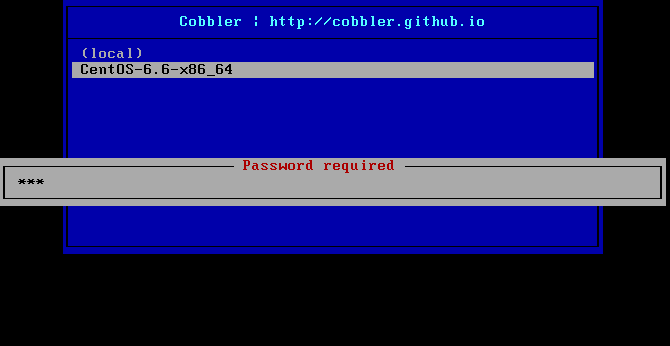
配置后新机器通过PXE安装系统时进入下界面,然后通过方向键/tab键选择要安装的系统会提示输入密码(这个密码就是上面生成的密码123):
12.5.8. cobbler同步所有配置项让其生效
一般如果修改了cobbler配置都需要同步配置才能使配置生效。
 1[root@centos-cobbler ~]# cobbler sync
 2task started: 2018-10-20_211742_sync
 3task started (id=Sync, time=Sat Oct 20 21:17:42 2018)
 4running pre-sync triggers
 5cleaning trees
 6removing: /var/www/cobbler/images/CentOS-6.6-x86_64
 7removing: /var/lib/tftpboot/pxelinux.cfg/default
 8removing: /var/lib/tftpboot/grub/efidefault
 9removing: /var/lib/tftpboot/grub/grub-x86_64.efi
10removing: /var/lib/tftpboot/grub/images
11removing: /var/lib/tftpboot/grub/grub-x86.efi
12removing: /var/lib/tftpboot/images/CentOS-6.6-x86_64
13removing: /var/lib/tftpboot/s390x/profile_list
14copying bootloaders
15trying hardlink /var/lib/cobbler/loaders/grub-x86_64.efi -> /var/lib/tftpboot/grub/grub-x86_64.efi
16trying hardlink /var/lib/cobbler/loaders/grub-x86.efi -> /var/lib/tftpboot/grub/grub-x86.efi
17copying distros to tftpboot
18copying files for distro: CentOS-6.6-x86_64
19trying hardlink /var/www/cobbler/ks_mirror/CentOS-6.6-x86_64/images/pxeboot/vmlinuz -> /var/lib/tftpboot/images/CentOS-6.6-x86_64/vmlinuz
20trying hardlink /var/www/cobbler/ks_mirror/CentOS-6.6-x86_64/images/pxeboot/initrd.img -> /var/lib/tftpboot/images/CentOS-6.6-x86_64/initrd.img
21copying images
22generating PXE configuration files
23generating PXE menu structure
24copying files for distro: CentOS-6.6-x86_64
25trying hardlink /var/www/cobbler/ks_mirror/CentOS-6.6-x86_64/images/pxeboot/vmlinuz -> /var/www/cobbler/images/CentOS-6.6-x86_64/vmlinuz
26trying hardlink /var/www/cobbler/ks_mirror/CentOS-6.6-x86_64/images/pxeboot/initrd.img -> /var/www/cobbler/images/CentOS-6.6-x86_64/initrd.img
27Writing template files for CentOS-6.6-x86_64
28rendering DHCP files
29generating /etc/dhcp/dhcpd.conf
30rendering TFTPD files
31generating /etc/xinetd.d/tftp
32processing boot_files for distro: CentOS-6.6-x86_64
33cleaning link caches
34running post-sync triggers
35running python triggers from /var/lib/cobbler/triggers/sync/post/*
36running python trigger cobbler.modules.sync_post_restart_services
37running: dhcpd -t -q
38received on stdout:
39received on stderr:
40running: service dhcpd restart
41received on stdout: Shutting down dhcpd: [  OK  ]
42Starting dhcpd: [  OK  ]
43
44received on stderr:
45running shell triggers from /var/lib/cobbler/triggers/sync/post/*
46running python triggers from /var/lib/cobbler/triggers/change/*
47running python trigger cobbler.modules.scm_track
48running shell triggers from /var/lib/cobbler/triggers/change/*
49*** TASK COMPLETE ***
12.5.9. 根据mac地址让服务器自动安装对应的系统
- 根据mac可以有两种安装系统方式:
通过命令添加mac地址对应的设备,然后自动化安装。
通过python脚本,调用cobbler的api接口然后把mac对应的设备都添加到cobbler中然后自动化安装。
注意
上面两种方法都需要先知道要装系统的服务器的mac地址才可以。
12.5.9.1. 通过命令添加mac对应的设备然后装机
cobbler默认是local启动,如果需要自动安装,需要改PXE启动项,或者统计需要安装系统的服务器的mac地址,然后根据mac地址安装对应的cobbler中的系统。
具体步骤是:
服务器mac地址是: 00:0C:29:4F:FF:56
1[root@centos-cobbler ~]# cobbler system add --name=qd_web001 --hostname=qd_web001 \
2> --mac=00:50:56:3A:E0:B1 \
3> --profile=CentOS-6.6-x86_64 \
4> --ip-address=192.168.6.210 --subnet=255.255.255.0 --gateway=192.168.6.2 --interface=eth0 \
5> --static=1 --name-servers="114.114.114.114 8.8.8.8" \
6> --kickstart=/var/lib/cobbler/kickstarts/CentOS6-x86_64.ks
查看通过cobbler安装的系统的系统名称和通过上面命令指定mac地址要安装的系统名称:
1[root@centos-cobbler ~]# cobbler system list
2qd_web001
删除通过上面命令通过mac指定安装的设备,然后可以重新添加:
1[root@centos-cobbler ~]# cobbler system remove --name=qd_web001
2[root@centos-cobbler ~]# cobbler system list
12.5.9.2. 上面命令集合
1cobbler system add --name=qd_web001 --hostname=qd_web001 \
2--mac=00:50:56:3A:E0:B1 \
3--profile=CentOS-6.6-x86_64 \
4--ip-address=192.168.6.210 --subnet=255.255.255.0 --gateway=192.168.6.2 --interface=eth0 \
5--static=1 --name-servers="114.114.114.114 8.8.8.8" \
6--kickstart=/var/lib/cobbler/kickstarts/CentOS6-x86_64.ks
7
8cobbler system list
9cobbler system remove --name=qd_web001
12.5.9.3. python调用cobbler的api完成mac添加
python脚本如下:
下面的脚本名 cobbler_api.py
上传到cobbler服务器,然后执行即可:
[root@centos-cobbler ~]# python cobbler_api.py
 1#!/usr/bin/env python
 2# -*- coding: utf-8 -*-
 3
 4import xmlrpclib
 5
 6class CobblerAPI(object):
 7
 8    def __init__(self, url, user, password):
 9        self.cobbler_user = user
10        self.cobbler_pass = password
11        self.cobbler_url = url
12
13    def add_system(self, hostname, ip_add, mac_add, profile):
14
15        ret = {
16            "result": True,
17            "comment": [],
18        }
19
20        # get token
21        remote = xmlrpclib.Server(self.cobbler_url)
22        token = remote.login(self.cobbler_user, self.cobbler_pass)
23
24        # add system
25        system_id = remote.new_system(token)
26        remote.modify_system(system_id, "name", hostname, token)
27        remote.modify_system(system_id, "hostname", hostname, token)
28        remote.modify_system(system_id, "modify_interface", {
29            "macaddress-eth0": mac_add,
30            "ipaddress-eth0": ip_add,
31            "dnsname-eth0": hostname
32        }, token)
33        remote.modify_system(system_id, "profile", profile, token)
34        remote.modify_system(system_id, token)
35        try:
36            remote.sync(token)
37        except Exception as e:
38            ret['result'] = False
39            ret['comment'].append(str(e))
40        return ret
41
42def main():
43    SERVER_IP = '192.168.6.10'
44    cobbler = CobblerAPI("http://192.168.6.10/cobbler_api", "cobbler", "123")
45    #cobbler = CobblerAPI("http://{}/cobbler_api".format(SERVER_IP), "cobbler", "123")
46    ret = cobbler.add_system(hostname='cobbler-api-test', ip_add='192.168.6.20', mac_add='00:50:56:3A:E0:B1',
47                            profile='CentOS-6.6-x86_64')
48    print(ret)
49
50if __name__ == '__main__':
51    main()
测试cobbler的api:
 1#!/usr/bin/env python
 2# -*- coding: utf-8 -*-
 3
 4import xmlrpclib
 5
 6SERVER_IP = '192.168.6.10'
 7
 8remote = xmlrpclib.Server("http://192.168.6.10/cobbler_api")
 9#remote = xmlrpclib.Server("http://{}/cobbler_api".format(SERVER_IP))
10
11print(remote.get_distros())
12print(remote.get_profiles())
13print(remote.get_systems())
14print(remote.get_images())
15print(remote.get_repos())