12.4. cobbler安装配置
- Date:
2018-09
12.4.1. 系统环境准备
12.4.1.1. 系统版本
1[root@centos-node1 ~]# cat /etc/redhat-release
2CentOS release 6.6 (Final)
3[root@centos-node1 ~]# uname -r
42.6.32-504.el6.x86_64
5[root@centos-node1 ~]# cat /etc/sysconfig/network
6NETWORKING=yes
7HOSTNAME=centos-node1
12.4.1.2. 网络时间同步
1[root@centos-cobbler ~]# date
2Thu Sep  6 21:07:25 CST 2018
3[root@centos-cobbler ~]# ntpdate pool.ntp.org
428 Sep 00:53:38 ntpdate[1577]: step time server 5.103.139.163 offset 1827966.915121 sec
12.4.1.3. 关闭selinux
注意
如果不关闭selinux也没有配置selinux。则安装以后zabbix会启动失败。会发现zabbix网页可以访问,但是提示zabbix服务没有启动。
- 永久关闭:
下面配置会让selinux的关闭重启系统后还是关闭状态。但是配置不会立即生效。
注意
通过 source /etc/selinux/config 也不能让修改的文件立即生效。所以需要下面的临时关闭的方式结合使用。
1[root@centos-cobbler ~]# sed -i 's/SELINUX=enforcing/SELINUX=disabled/' /etc/selinux/config
2[root@centos-cobbler ~]# grep SELINUX /etc/selinux/config
3# SELINUX= can take one of these three values:
4SELINUX=disabled
5# SELINUXTYPE= can take one of these two values:
6SELINUXTYPE=targeted
- 临时关闭:
下面配置是立即生效,但是系统重启后会失效。
1[root@centos-cobbler ~]# getenforce
2Enforcing
3[root@centos-cobbler ~]# setenforce 0
4[root@centos-cobbler ~]# getenforce
5Permissive
12.4.1.4. 关闭防火墙
注意
防火墙一般都是关闭。如果不不关闭,也可以通过配置规则允许所有使用的端口被访问。
1[root@centos-cobbler ~]# /etc/init.d/iptables stop
2iptables: Setting chains to policy ACCEPT: filter          [  OK  ]
3iptables: Flushing firewall rules:                         [  OK  ]
4iptables: Unloading modules:                               [  OK  ]
关闭防火墙开机自启动
1[root@centos-cobbler ~]# chkconfig iptables off
12.4.1.5. epel源导入
1[root@centos-cobbler ~]# wget -O /etc/yum.repos.d/epel.repo http://mirrors.aliyun.com/repo/epel-6.repo
2[root@centos-cobbler ~]# rpm -ivh http://mirrors.aliyun.com/epel/epel-release-latest-6.noarch.rpm
12.4.1.6. 系统准备命令集合
1ntpdate pool.ntp.org
2sed -i 's/SELINUX=enforcing/SELINUX=disabled/' /etc/selinux/config
3setenforce 0
4/etc/init.d/iptables stop
5chkconfig iptables off
6rpm -ivh http://mirrors.aliyun.com/epel/epel-release-latest-6.noarch.rpm
12.4.2. cobbler安装
- 参考:
https://www.ibm.com/developerworks/cn/linux/l-cobbler/index.html
- 安装依赖包:
mod_ssl
python-cheetah
createrepo
python-netaddr
genisoimage
mod_wsgi
libpthread.so.0
libpython2.6.so.1.0
python-libs
python-simplejson
libyaml
PyYAML
Django
syslinux
1[root@centos-cobbler ~]# yum -y install mod_ssl python-cheetah createrepo python-netaddr genisoimage mod_wsgi syslinux
2[root@centos-cobbler ~]#  yum install libpthread.so.0 -y
3[root@centos-cobbler ~]#  yum install libpython2.6.so.1.0 -y
4[root@centos-cobbler ~]#  yum install python-libs -y
5[root@centos-cobbler ~]#  yum install -y python-simplejson
6[root@centos-cobbler ~]# rpm -ivh http://mirror.centos.org/centos/6/os/x86_64/Packages/libyaml-0.1.3-4.el6_6.x86_64.rpm
7[root@centos-cobbler ~]# rpm -ivh http://mirror.centos.org/centos/6/os/x86_64/Packages/PyYAML-3.10-3.1.el6.x86_64.rpm
8[root@centos-cobbler ~]# rpm -ivh https://kojipkgs.fedoraproject.org//packages/Django14/1.4.14/1.el6/noarch/Django14-1.4.14-1.el6.noarch.rpm
安装cobbler和所需的服务
1[root@centos-cobbler ~]# yum -y install cobbler cobbler-web dhcp tftp-server pykickstart httpd
检查cobbler安装路径信息:
1[root@centos-cobbler ~]# rpm -ql cobbler
12.4.2.1. 以下只是部分目录说明
配置文件目录 /etc/cobbler
/etc/cobbler |
配置文件目录 |
/etc/cobbler/settings |
cobbler主配置文件,这个文件是YAML格式,Cobbler是python写的程序。 |
/etc/cobbler/dhcp.template |
DHCP服务的配置模板 |
/etc/cobbler/tftpd.template |
tftp服务的配置模板 |
/etc/cobbler/rsync.template |
rsync服务的配置模板 |
/etc/cobbler/iso |
iso模板配置文件目录 |
/etc/cobbler/pxe |
pxe模板文件目录 |
/etc/cobbler/power |
电源的配置文件目录 |
/etc/cobbler/users.conf |
Web服务授权配置文件 |
/etc/cobbler/users.digest |
用于web访问的用户名密码配置文件 |
/etc/cobbler/dnsmasq.template |
DNS服务的配置模板 |
/etc/cobbler/modules.conf |
Cobbler模块配置文件 |
数据目录 /var/lib/cobbler
/var/lib/cobbler/config |
配置文件 |
/var/lib/cobbler/kickstarts |
默认存放kickstart文件 |
/var/lib/cobbler/loaders |
存放的各种引导程序 |
cobbler导入的镜像目录 /var/www/cobbler
/var/www/cobbler/ks_mirror |
导入的系统镜像列表 |
/var/www/cobbler/images |
导入的系统镜像启动文件 |
/var/www/cobbler/repo_mirror |
yum源存储目录 |
cobbler日志目录 /var/log/cobbler
/var/log/cobbler/install.log |
客户端系统安装日志 |
/var/log/cobbler/cobbler.log |
cobbler日志 |
配置httpd配置文件并启动httpd服务
1[root@centos-cobbler ~]# sed -i "277i ServerName 127.0.0.1:80" /etc/httpd/conf/httpd.conf
2
3[root@centos-cobbler ~]# /etc/init.d/httpd restart
启动cobbler服务
1[root@centos-cobbler ~]# /etc/init.d/cobblerd start
12.4.2.2. 安装命令汇总
1yum -y install mod_ssl python-cheetah createrepo python-netaddr genisoimage mod_wsgi syslinux libpthread.so.0 libpython2.6.so.1.0 python-libs python-simplejson
2rpm -ivh http://mirror.centos.org/centos/6/os/x86_64/Packages/libyaml-0.1.3-4.el6_6.x86_64.rpm
3rpm -ivh http://mirror.centos.org/centos/6/os/x86_64/Packages/PyYAML-3.10-3.1.el6.x86_64.rpm
4rpm -ivh https://kojipkgs.fedoraproject.org//packages/Django14/1.4.14/1.el6/noarch/Django14-1.4.14-1.el6.noarch.rpm
5yum -y install cobbler cobbler-web dhcp tftp-server pykickstart httpd
6sed -i "277i ServerName 127.0.0.1:80" /etc/httpd/conf/httpd.conf
7/etc/init.d/httpd restart
8/etc/init.d/cobblerd start
12.4.3. cobbler配置
检查cobbler,如果检查报错,可以重启cobbler服务和httpd服务。或者参考: cobbler常见问题总结
12.4.3.1. 检查需要配置的内容
 1[root@centos-cobbler ~]# cobbler check
 2The following are potential configuration items that you may want to fix:
 3
 41 : The 'server' field in /etc/cobbler/settings must be set to something other than localhost, or kickstarting features will not work.  This should be a resolvable hostname or IP for the boot server as reachable by all machines that will use it.
 52 : For PXE to be functional, the 'next_server' field in /etc/cobbler/settings must be set to something other than 127.0.0.1, and should match the IP of the boot server on the PXE network.
 63 : SELinux is enabled. Please review the following wiki page for details on ensuring cobbler works correctly in your SELinux environment:
 7    https://github.com/cobbler/cobbler/wiki/Selinux
 84 : change 'disable' to 'no' in /etc/xinetd.d/tftp
 95 : some network boot-loaders are missing from /var/lib/cobbler/loaders, you may run 'cobbler get-loaders' to download them, or, if you only want to handle x86/x86_64 netbooting, you may ensure that you have installed a *recent* version of the syslinux package installed and can ignore this message entirely.  Files in this directory, should you want to support all architectures, should include pxelinux.0, menu.c32, elilo.efi, and yaboot. The 'cobbler get-loaders' command is the easiest way to resolve these requirements.
106 : change 'disable' to 'no' in /etc/xinetd.d/rsync
117 : since iptables may be running, ensure 69, 80/443, and 25151 are unblocked
128 : debmirror package is not installed, it will be required to manage debian deployments and repositories
139 : The default password used by the sample templates for newly installed machines (default_password_crypted in /etc/cobbler/settings) is still set to 'cobbler' and should be changed, try: "openssl passwd -1 -salt 'random-phrase-here' 'your-password-here'" to generate new one
1410 : fencing tools were not found, and are required to use the (optional) power management features. install cman or fence-agents to use them
15
16Restart cobblerd and then run 'cobbler sync' to apply changes.
12.4.3.2. 修改cobbler配置文件
 1[root@centos-cobbler ~]# cp /etc/cobbler/settings{,.ori}
 2[root@centos-cobbler ~]# ls /etc/cobbler/
 3auth.conf       completions       import_rsync_whitelist  modules.conf    power      rsync.exclude       settings        users.conf    zone.template
 4cheetah_macros  dhcp.template     iso                     mongodb.conf    pxe        rsync.template      settings.ori    users.digest  zone_templates
 5cobbler_bash    dnsmasq.template  ldap                    named.template  reporting  secondary.template  tftpd.template  version
 6[root@centos-cobbler ~]# sed -i 's/server: 127.0.0.1/server: 192.168.6.10/' /etc/cobbler/settings
 7[root@centos-cobbler ~]# sed -i 's/next_server: 127.0.0.1/next_server: 192.168.6.10/' /etc/cobbler/settings
 8[root@centos-cobbler ~]# sed -i 's/manage_dhcp: 0/manage_dhcp: 1/' /etc/cobbler/settings
 9[root@centos-cobbler ~]# sed -i 's/pxe_just_once: 0/pxe_just_once: 1/' /etc/cobbler/settings
10[root@centos-cobbler ~]# openssl passwd -1 -salt 'abc' '123'
11$1$abc$98/EDagBiz63dxD3fhRFk1
12[root@centos-cobbler ~]# sed -i 's#default_password_crypted: "$1$mF86/UHC$WvcIcX2t6crBz2onWxyac."#default_password_crypted: "$1$abc$98/EDagBiz63dxD3fhRFk1"#' /etc/cobbler/settings
- server: 127.0.0.1
配置cobbler服务地址,这个IP需要是服务器本地IP,否则会报错。
- next_server: 127.0.0.1
用cobbler管理dhcp时,这是dhcp地址。PXE启动时通过这个服务器获取IP。
- manage_dhcp: 0
是否启用cobbler管理DHCP,此时不用配置dhcp,直接配置cobbler的dhcp配置模版,然后同步即可。1是启用,0是关闭。
- pxe_just_once: 0
是否启用PXE安装一次后当系统重启不自动循环重启。默认关闭,需要手动开启。
- default_password_crypted: “$1$mF86/UHC$WvcIcX2t6crBz2onWxyac.”
当系统的kickstart文件中配置装机的root密码配置为
rootpw --iscrypted $default_password_crypted时,安装的系统使用这个密码。
12.4.3.3. 修改cobbler的dhcp模版
如果简单配置,可以参考kickstart安装过程中的DHCP配置,但是那样配置很多cobbler中的变量就不能用了。
本实例使用cobbler自带的dhcp模版,进行修改使用:
愿配置文件:
 1[root@centos-cobbler ~]# cat /etc/cobbler/dhcp.template
 2# ******************************************************************
 3# Cobbler managed dhcpd.conf file
 4#
 5# generated from cobbler dhcp.conf template ($date)
 6# Do NOT make changes to /etc/dhcpd.conf. Instead, make your changes
 7# in /etc/cobbler/dhcp.template, as /etc/dhcpd.conf will be
 8# overwritten.
 9#
10# ******************************************************************
11
12ddns-update-style interim;
13
14allow booting;
15allow bootp;
16
17ignore client-updates;
18set vendorclass = option vendor-class-identifier;
19
20option pxe-system-type code 93 = unsigned integer 16;
21
22subnet 192.168.1.0 netmask 255.255.255.0 {
23    option routers             192.168.1.5;
24    option domain-name-servers 192.168.1.1;
25    option subnet-mask         255.255.255.0;
26    range dynamic-bootp        192.168.1.100 192.168.1.254;
27    default-lease-time         21600;
28    max-lease-time             43200;
29    next-server                $next_server;
30    class "pxeclients" {
31        match if substring (option vendor-class-identifier, 0, 9) = "PXEClient";
32        if option pxe-system-type = 00:02 {
33                filename "ia64/elilo.efi";
34        } else if option pxe-system-type = 00:06 {
35                filename "grub/grub-x86.efi";
36        } else if option pxe-system-type = 00:07 {
37                filename "grub/grub-x86_64.efi";
38        } else {
39                filename "pxelinux.0";
40        }
41    }
42
43}
44
45#for dhcp_tag in $dhcp_tags.keys():
46    ## group could be subnet if your dhcp tags line up with your subnets
47    ## or really any valid dhcpd.conf construct ... if you only use the
48    ## default dhcp tag in cobbler, the group block can be deleted for a
49    ## flat configuration
50# group for Cobbler DHCP tag: $dhcp_tag
51group {
52        #for mac in $dhcp_tags[$dhcp_tag].keys():
53            #set iface = $dhcp_tags[$dhcp_tag][$mac]
54    host $iface.name {
55        hardware ethernet $mac;
56        #if $iface.ip_address:
57        fixed-address $iface.ip_address;
58        #end if
59        #if $iface.hostname:
60        option host-name "$iface.hostname";
61        #end if
62        #if $iface.netmask:
63        option subnet-mask $iface.netmask;
64        #end if
65        #if $iface.gateway:
66        option routers $iface.gateway;
67        #end if
68        #if $iface.enable_gpxe:
69        if exists user-class and option user-class = "gPXE" {
70            filename "http://$cobbler_server/cblr/svc/op/gpxe/system/$iface.owner";
71        } else if exists user-class and option user-class = "iPXE" {
72            filename "http://$cobbler_server/cblr/svc/op/gpxe/system/$iface.owner";
73        } else {
74            filename "undionly.kpxe";
75        }
76        #else
77        filename "$iface.filename";
78        #end if
79        ## Cobbler defaults to $next_server, but some users
80        ## may like to use $iface.system.server for proxied setups
81        next-server $next_server;
82        ## next-server $iface.next_server;
83    }
84        #end for
85}
86#end for
修改配置文件:
 1[root@centos-cobbler ~]# sed -i 's#subnet 192.168.1.0 netmask 255.255.255.0 {#subnet 192.168.6.0 netmask 255.255.255.0 {#' /etc/cobbler/dhcp.template
 2[root@centos-cobbler ~]# sed -i 's#option routers             192.168.1.5;#option routers             192.168.6.2;#' /etc/cobbler/dhcp.template
 3[root@centos-cobbler ~]# sed -i 's/option domain-name-servers 192.168.1.1;/#option domain-name-servers 192.168.1.1;/' /etc/cobbler/dhcp.template
 4[root@centos-cobbler ~]# sed -i 's#range dynamic-bootp        192.168.1.100 192.168.1.254;#range dynamic-bootp        192.168.6.100 192.168.6.200;#' /etc/cobbler/dhcp.template
 5
 6[root@centos-cobbler ~]# cat /etc/cobbler/dhcp.template
 7# ******************************************************************
 8# Cobbler managed dhcpd.conf file
 9#
10# generated from cobbler dhcp.conf template ($date)
11# Do NOT make changes to /etc/dhcpd.conf. Instead, make your changes
12# in /etc/cobbler/dhcp.template, as /etc/dhcpd.conf will be
13# overwritten.
14#
15# ******************************************************************
16
17ddns-update-style interim;
18
19allow booting;
20allow bootp;
21
22ignore client-updates;
23set vendorclass = option vendor-class-identifier;
24
25option pxe-system-type code 93 = unsigned integer 16;
26
27subnet 192.168.6.0 netmask 255.255.255.0 {
28    option routers             192.168.6.1;
29    #option domain-name-servers 192.168.1.1;
30    option subnet-mask         255.255.255.0;
31    range dynamic-bootp        192.168.6.100 192.168.6.200;
32    default-lease-time         21600;
33    max-lease-time             43200;
34    next-server                $next_server;
35    class "pxeclients" {
36        match if substring (option vendor-class-identifier, 0, 9) = "PXEClient";
37        if option pxe-system-type = 00:02 {
38                filename "ia64/elilo.efi";
39        } else if option pxe-system-type = 00:06 {
40                filename "grub/grub-x86.efi";
41        } else if option pxe-system-type = 00:07 {
42                filename "grub/grub-x86_64.efi";
43        } else {
44                filename "pxelinux.0";
45        }
46    }
47
48}
49
50#for dhcp_tag in $dhcp_tags.keys():
51    ## group could be subnet if your dhcp tags line up with your subnets
52    ## or really any valid dhcpd.conf construct ... if you only use the
53    ## default dhcp tag in cobbler, the group block can be deleted for a
54    ## flat configuration
55# group for Cobbler DHCP tag: $dhcp_tag
56group {
57        #for mac in $dhcp_tags[$dhcp_tag].keys():
58            #set iface = $dhcp_tags[$dhcp_tag][$mac]
59    host $iface.name {
60        hardware ethernet $mac;
61        #if $iface.ip_address:
62        fixed-address $iface.ip_address;
63        #end if
64        #if $iface.hostname:
65        option host-name "$iface.hostname";
66        #end if
67        #if $iface.netmask:
68        option subnet-mask $iface.netmask;
69        #end if
70        #if $iface.gateway:
71        option routers $iface.gateway;
72        #end if
73        #if $iface.enable_gpxe:
74        if exists user-class and option user-class = "gPXE" {
75            filename "http://$cobbler_server/cblr/svc/op/gpxe/system/$iface.owner";
76        } else if exists user-class and option user-class = "iPXE" {
77            filename "http://$cobbler_server/cblr/svc/op/gpxe/system/$iface.owner";
78        } else {
79            filename "undionly.kpxe";
80        }
81        #else
82        filename "$iface.filename";
83        #end if
84        ## Cobbler defaults to $next_server, but some users
85        ## may like to use $iface.system.server for proxied setups
86        next-server $next_server;
87        ## next-server $iface.next_server;
88    }
89        #end for
90}
91#end for
12.4.3.4. 修改tftp配置信息
1[root@centos-cobbler ~]# sed -i '14s/yes/no/' /etc/xinetd.d/tftp
2[root@centos-cobbler ~]# sed -i '6s/yes/no/' /etc/xinetd.d/rsync
12.4.3.5. 从网络获取cobbler配置
1[root@server ~]# /etc/init.d/xinetd start
2[root@server ~]# /etc/init.d/cobblerd restart
3
4[root@centos-cobbler ~]# cobbler get-loaders
12.4.3.6. cobbler配置信息同步到运行服务中
 1[root@centos-cobbler ~]# cobbler sync
 2task started: 2018-09-07_005728_sync
 3task started (id=Sync, time=Fri Sep  7 00:57:28 2018)
 4running pre-sync triggers
 5cleaning trees
 6removing: /var/lib/tftpboot/pxelinux.cfg/default
 7removing: /var/lib/tftpboot/grub/images
 8removing: /var/lib/tftpboot/grub/efidefault
 9removing: /var/lib/tftpboot/grub/grub-x86.efi
10removing: /var/lib/tftpboot/grub/grub-x86_64.efi
11removing: /var/lib/tftpboot/s390x/profile_list
12copying bootloaders
13trying hardlink /var/lib/cobbler/loaders/grub-x86.efi -> /var/lib/tftpboot/grub/grub-x86.efi
14trying hardlink /var/lib/cobbler/loaders/grub-x86_64.efi -> /var/lib/tftpboot/grub/grub-x86_64.efi
15copying distros to tftpboot
16copying images
17generating PXE configuration files
18generating PXE menu structure
19rendering DHCP files
20generating /etc/dhcp/dhcpd.conf
21rendering TFTPD files
22generating /etc/xinetd.d/tftp
23cleaning link caches
24running post-sync triggers
25running python triggers from /var/lib/cobbler/triggers/sync/post/*
26running python trigger cobbler.modules.sync_post_restart_services
27running: dhcpd -t -q
28received on stdout:
29received on stderr:
30running: service dhcpd restart
31received on stdout: 正在启动 dhcpd:[确定]
32
33received on stderr:
34running shell triggers from /var/lib/cobbler/triggers/sync/post/*
35running python triggers from /var/lib/cobbler/triggers/change/*
36running python trigger cobbler.modules.scm_track
37running shell triggers from /var/lib/cobbler/triggers/change/*
38*** TASK COMPLETE ***
39[root@centos-cobbler ~]# echo $?
400
再次检查
1[root@centos-cobbler ~]# cobbler check
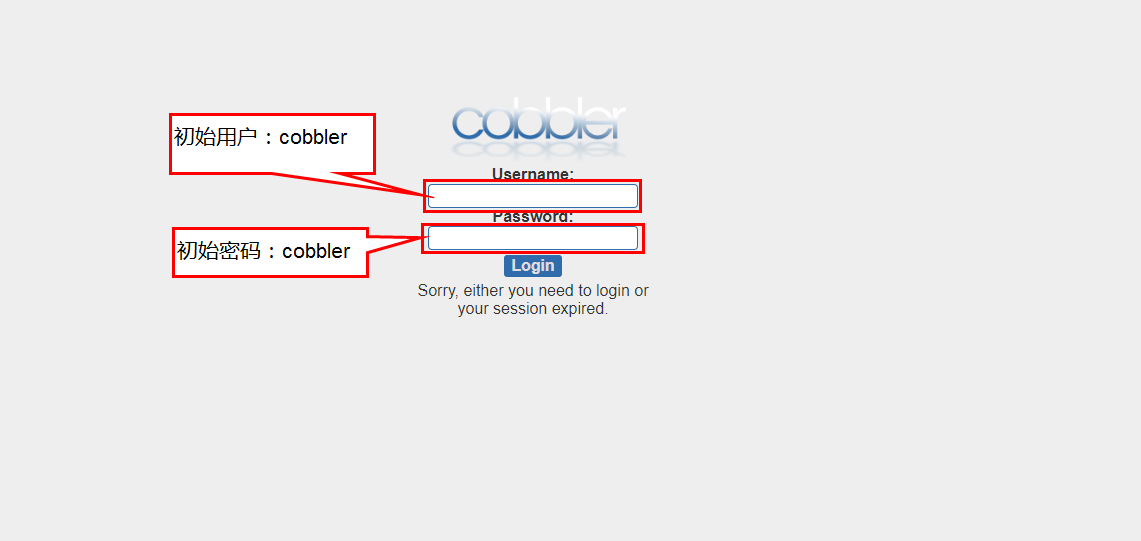
用浏览器访问 http://192.168.161.137/cobbler_web 进入如下界面:
小技巧
初始账号:cobbler
初始密码:cobbler
- 修改初始密码的方法:
/etc/cobbler/users.confWeb服务授权配置文件/etc/cobbler/users.digest用于web访问的用户名密码配置文件
查看现在的密码:
1[root@centos-cobbler ~]# cat /etc/cobbler/users.digest
2cobbler:Cobbler:a2d6bae81669d707b72c0bd9806e01f3
设置Cobbler web用户登陆密码,在Cobbler组添加cobbler用户,提示输入2遍密码确认
1[root@centos-cobbler ~]# htdigest /etc/cobbler/users.digest "Cobbler" cobbler
2Changing password for user cobbler in realm Cobbler
3New password: 123456
4Re-type new password:123456
12.4.3.7. cobbler配置
 1cp /etc/cobbler/settings{,.ori}
 2
 3sed -i 's/server: 127.0.0.1/server: 192.168.6.10/' /etc/cobbler/settings
 4sed -i 's/next_server: 127.0.0.1/next_server: 192.168.6.10/' /etc/cobbler/settings
 5sed -i 's/manage_dhcp: 0/manage_dhcp: 1/' /etc/cobbler/settings
 6sed -i 's/pxe_just_once: 0/pxe_just_once: 1/' /etc/cobbler/settings
 7sed -i 's#default_password_crypted: "$1$mF86/UHC$WvcIcX2t6crBz2onWxyac."#default_password_crypted: "$1$abc$98/EDagBiz63dxD3fhRFk1"#' /etc/cobbler/settings
 8
 9
10sed -i '14s/yes/no/' /etc/xinetd.d/tftp
11sed -i '6s/yes/no/' /etc/xinetd.d/rsync
12
13sed -i 's#subnet 192.168.1.0 netmask 255.255.255.0 {#subnet 192.168.6.0 netmask 255.255.255.0 {#' /etc/cobbler/dhcp.template
14sed -i 's#option routers             192.168.1.5;#option routers             192.168.6.1;#' /etc/cobbler/dhcp.template
15sed -i 's/option domain-name-servers 192.168.1.1;/#option domain-name-servers 192.168.1.1;/' /etc/cobbler/dhcp.template
16sed -i 's#range dynamic-bootp        192.168.1.100 192.168.1.254;#range dynamic-bootp        192.168.6.100 192.168.6.200;#' /etc/cobbler/dhcp.template
17
18/etc/init.d/xinetd start
19/etc/init.d/cobblerd restart
20
21cobbler get-loaders
22cobbler sync
23cobbler check
如果修改cobbler网页登陆密码:
1htdigest /etc/cobbler/users.digest "Cobbler" cobbler
12.4.4. cobbler安装配置命令汇总
 1ntpdate pool.ntp.org
 2sed -i 's/SELINUX=enforcing/SELINUX=disabled/' /etc/selinux/config
 3setenforce 0
 4/etc/init.d/iptables stop
 5chkconfig iptables off
 6rpm -ivh http://mirrors.aliyun.com/epel/epel-release-latest-6.noarch.rpm
 7
 8yum -y install mod_ssl python-cheetah createrepo python-netaddr genisoimage mod_wsgi syslinux libpthread.so.0 libpython2.6.so.1.0 python-libs python-simplejson
 9rpm -ivh http://mirror.centos.org/centos/6/os/x86_64/Packages/libyaml-0.1.3-4.el6_6.x86_64.rpm
10rpm -ivh http://mirror.centos.org/centos/6/os/x86_64/Packages/PyYAML-3.10-3.1.el6.x86_64.rpm
11rpm -ivh https://kojipkgs.fedoraproject.org//packages/Django14/1.4.14/1.el6/noarch/Django14-1.4.14-1.el6.noarch.rpm
12yum -y install cobbler cobbler-web dhcp tftp-server pykickstart httpd
13sed -i "277i ServerName 127.0.0.1:80" /etc/httpd/conf/httpd.conf
14/etc/init.d/httpd restart
15/etc/init.d/cobblerd start
16
17cp /etc/cobbler/settings{,.ori}
18
19sed -i 's/server: 127.0.0.1/server: 192.168.6.10/' /etc/cobbler/settings
20sed -i 's/next_server: 127.0.0.1/next_server: 192.168.6.10/' /etc/cobbler/settings
21sed -i 's/manage_dhcp: 0/manage_dhcp: 1/' /etc/cobbler/settings
22sed -i 's/pxe_just_once: 0/pxe_just_once: 1/' /etc/cobbler/settings
23sed -i 's#default_password_crypted: "$1$mF86/UHC$WvcIcX2t6crBz2onWxyac."#default_password_crypted: "$1$abc$98/EDagBiz63dxD3fhRFk1"#' /etc/cobbler/settings
24
25
26sed -i '14s/yes/no/' /etc/xinetd.d/tftp
27sed -i '6s/yes/no/' /etc/xinetd.d/rsync
28
29sed -i 's#subnet 192.168.1.0 netmask 255.255.255.0 {#subnet 192.168.6.0 netmask 255.255.255.0 {#' /etc/cobbler/dhcp.template
30sed -i 's#option routers             192.168.1.5;#option routers             192.168.6.1;#' /etc/cobbler/dhcp.template
31sed -i 's/option domain-name-servers 192.168.1.1;/#option domain-name-servers 192.168.1.1;/' /etc/cobbler/dhcp.template
32sed -i 's#range dynamic-bootp        192.168.1.100 192.168.1.254;#range dynamic-bootp        192.168.6.100 192.168.6.200;#' /etc/cobbler/dhcp.template
33
34/etc/init.d/xinetd start
35/etc/init.d/cobblerd restart
36
37cobbler get-loaders
38cobbler sync
39cobbler check